
VisualComp 2.45
Hear the difference yourself


Demo mix courtesy of Asher Postman, produced in FL Studio.
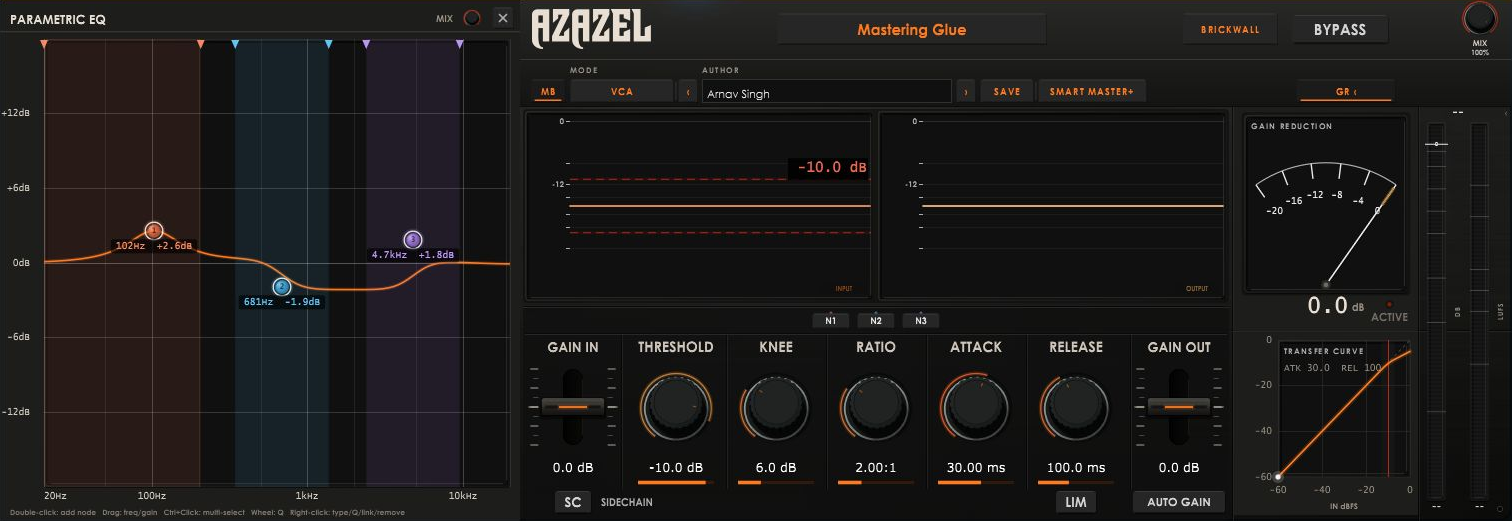
A compressor that sees your mix. Multiband dynamics, a Visual Parametric EQ, Sidechain Compression from an External Input and mastering-grade output shaping (Glue Compression) in one plugin — controlled by a live, interactive graph instead of a wall of just knobs.
- VST3 & Standalone · Windows & Mac
- 8-node visual parametric EQ
- Upward and Downward Multiband compression
- VCA / FET / Optical / Tube characters
- Peak, RMS and approximate LUFS metering
Glue + Multiband + Sidechain
VisualComp 2.45 merges a full parametric EQ with per-band multiband compression and a broadband master compressor, all controlled through one interactive frequency graph. Instead of switching between separate EQ and compressor screens, you shape tone and dynamics on the same curve. It runs on Windows and Mac in any VST3 host, or standalone for quick auditioning.
Clean and fast. Transparent glue on the bus, control without colour.
Fast attack with musical bite. Drums, bass, rap vocals, parallel crush.
Program-dependent and smooth. Vocals, acoustic guitar, bass.
Variable-mu warmth and gentle harmonics. Lead vocals, mix bus, mastering.
Multiband compression, drawn as an EQ
VisualComp turns every EQ node into its own dynamics band. Instead of splitting the signal with fixed crossovers, you draw the frequency ranges you want to control and set how each one reacts; downward for taming, upward for lifting detail, or blended with the broadband compressor for glue.
It is the same compressor engine running across multiple focused detectors, so the low end, midrange and top end each get their own threshold, ratio, range and timing while staying phase-coherent.
Inside the plugin
Core compressor engine
A broadband compressor with four selectable circuit character models. Threshold, Knee, Ratio, Attack, Release, Range, Makeup Gain and a wet/dry Mix knob for parallel-style blending. A three-mode output clipper (Soft, Brickwall or Off) sits after the compressor for final peak control, sharing one fixed lookahead delay line across all three modes — switching clip styles live never introduces clicks or changes reported latency.
Visual, multiband-aware EQ
A full 8-node parametric equalizer — Bell, Low Shelf, High Shelf, High-Pass, Low-Pass and Notch, all built on industry-standard RBJ biquad coefficients — drawn as a live, draggable curve rather than a numeric list. Double-click the graph to create a node, drag for frequency and gain, and shape Q and filter type with the mouse wheel or the on-canvas Dynamic Island popup.
Per-band dynamics
Any EQ node can be linked to the compressor. A linked node gets its own bandpass-filtered detector and becomes a genuine dynamics band with its own Threshold, Knee, Ratio, Range, Attack and Release — reacting only to energy in that frequency range. New nodes link by default, so sculpting a frequency automatically gives you a dynamics band to control it with.
Upward, downward, or both
The Range control (±30 dB) sets how far a band's dynamics can swing the gain, and its sign chooses the direction: negative for classic downward compression, positive to flip the band into upward mode — lifting buried low-level detail like room tone, sustain tails and quiet vocal phrases without touching anything already loud. Band edge markers snap to neighbours within 100 Hz for edge-to-edge precision.
Metering you can trust at a glance
Peak and RMS meters with musical ballistics, plus an approximate LUFS reading (continuous, EMA-smoothed K-weighting) for a fast loudness read while mixing; a mixing aid, not a certified BS.1770 delivery measurement. A dedicated Curve/GR panel shows the live transfer curve and gain-reduction activity, collapsible when you don't need it.
Interface & workflow
Built around input/output waveform displays, a large central EQ/dynamics graph, and docked side panels that slide out from their own edge only when needed. Every node's full state; frequency, gain, Q, filter type, link status and its own dynamics settings.It saves with your session or exports as a standalone preset, independent of host automation lanes.
“VisualComp has become my go-to for quick mix decisions. The EQ and compression on one graph saves me so much time, and the free price tag is just unreal.”
Why engineers reach for it
- One graph, two jobs: draw the EQ curve and get real per-band compression for free.
- Four compressor characters (VCA / FET / Optical / Tube) in one broadband stage.
- Musically-tapered Threshold knob — precision where you actually work, -20..0 dB.
- Upward or downward per band, chosen by a single Range knob's sign.
- Zero-latency-change output clipping — switch Soft / Brickwall / Off live, mid-mix.
- Built-in approximate LUFS reading alongside peak and RMS.
- Genre-organized factory preset library for Mastering, Drums, Vocals, Bass and more.
- VST3 + Standalone, Windows and Mac.
Presets tuned for real mixes
A curated factory library organized by use case — starting points built for real mixing scenarios, not factory default knob positions. Save and recall your own from a dedicated user preset folder.
Glue, warmth, mix-bus punch and smoothing.
Kick punch, snare crack, room crush, overhead taming, percussion control.
Smooth and upfront leads, thickening, backing-vocal tightening, breath boosting.
Transparent corrective settings alongside deliberately coloured ones.
Technical specs
Anatomy of the interface
Every part of the panel does one job, and shows you it doing it. Here's what you're looking at.
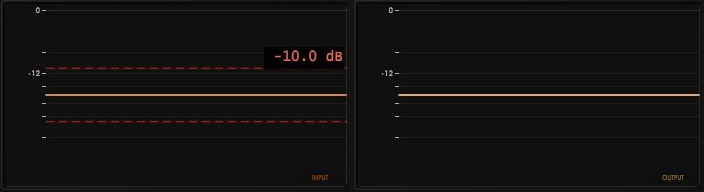
The waveform displays
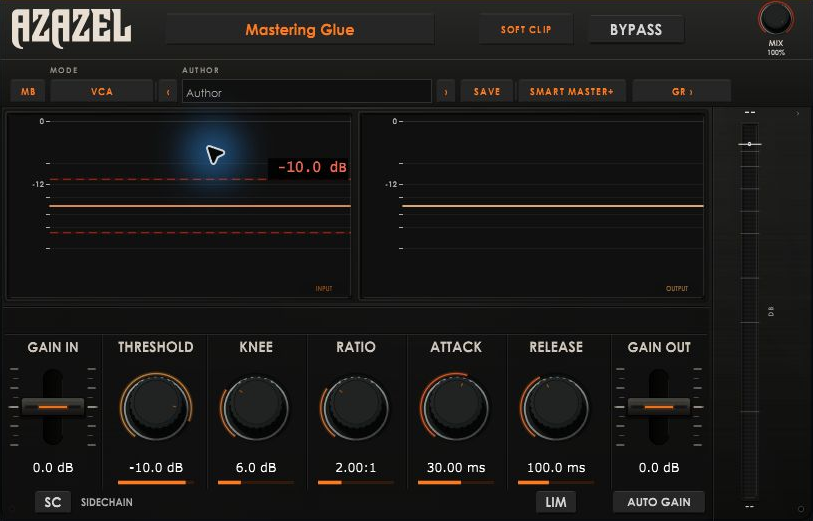
Two oscilloscopes show your signal before and after processing, with the threshold drawn straight across the waveform as a dashed line. Set the attack too slow and you see the transient escape; set the release too fast and you see the pumping. Toggle bypass while watching the output side — the change in envelope shape is the clearest picture of what your settings actually do.
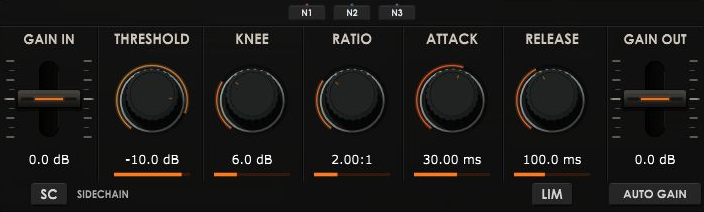
The dynamics row
Gain In on the left, the five core controls in the centre, Gain Out on the right with Auto Gain, a 0 dB ceiling limiter and the sidechain toggle. Drag anywhere inside a control's box — you never have to hit the knob itself. Hold Ctrl (Cmd on macOS) for fine adjustment, and double-click any control to reset it.
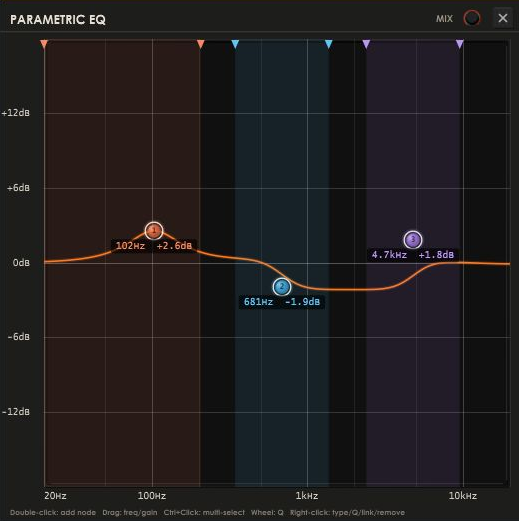
The parametric EQ panel
The full-height docked parametric EQ: a frequency graph from 20 Hz to 20 kHz with support for eight nodes. Double-click the graph to add a node, drag for frequency and gain, use the wheel for Q and right-click for filter type. Every node can be linked to the compressor, turning it into a dynamics band with its own detector.
The metering column
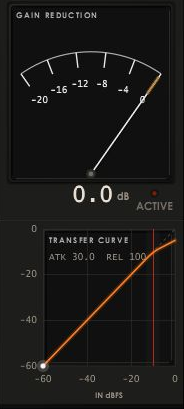
An analogue gain-reduction needle (0 to −20 dB with an activity lamp) above a live transfer curve plotting input against output level, with a moving operating-point dot and the current attack and release printed beneath. 1–3 dB for mix-bus glue, 3–8 dB on vocals, bass and single tracks, 10 dB and beyond for parallel or effect compression.
Per-band multiband dynamics
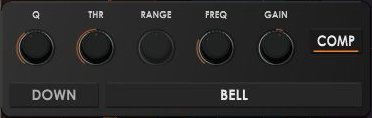
Select a node to open its controls for Q, Threshold, Range, Frequency and Gain. COMP links the band to the compressor; DOWN or UP selects the dynamics direction, and the filter selector changes its shape. The main dynamics row follows the selected band, giving it its own threshold, knee, ratio, attack and release.

The top bar
The header brings together the preset browser, author field, MB toggle, character selector, Save and Smart Master+. Clipper mode, Bypass and Mix sit above, with a GR toggle for the gain-reduction and transfer-curve panel.
Factory presets
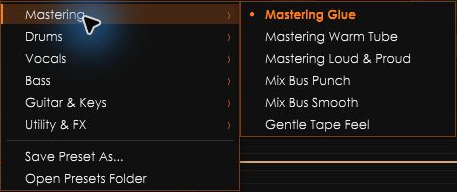
Start with a factory preset for mastering, drums, vocals, bass, guitar and keys, or utility effects. The mastering bank includes Glue, Warm Tube, Loud & Proud, Mix Bus Punch, Mix Bus Smooth and Gentle Tape Feel. Save your own settings from the same browser.
A compact workspace
Close the docked EQ and gain-reduction panels when you want to focus on the main compressor. The input and output displays, dynamics controls, sidechain, limiter and output gain stay within reach.
Who it's for
Mixing and mastering engineers who want to shape tone and control dynamics in the same gesture — sculpting a frequency and immediately deciding how it should behave, without tabbing between an EQ and a compressor and losing the mental model of the mix in between. Its visual, node-based workflow suits producers who think in curves and shapes as much as in numbers.
FAQ
Only 89 free downloads left. After that VisualComp returns to $49.